
The dock door is where warehouse accuracy is either protected or lost.
A truck backs in, pallets move fast, operators stage goods, and the WMS waits for the record that tells everyone what actually happened. If that record is wrong, the error does not stay at the dock. It moves into inventory, replenishment, shipping, billing, customer service, and planning.
Dock door automation is built to stop that chain reaction.
At its best, dock door automation uses RFID, sensors, edge software, and workflow rules to identify assets as they enter or leave a facility. It supports automated receiving, automated shipping, shipment validation, inventory updates, and exception alerts without forcing workers to scan every pallet by hand.
But there is a catch.
A dock door is not a clean lab environment. It is a dense, high-motion zone filled with pallets, cartons, forklifts, returnable containers, metal racks, workers, and adjacent staging lanes. An RFID reader may see the asset that crossed the door, but it may also see tags nearby that never moved.
That is why the goal is not more reads. The goal is trusted movement events.
A basic RFID read says a tag was detected. A validated dock event says the right pallet entered through receiving door 4, the wrong tote moved toward the shipping lane, or the outbound load matches the shipment record.
That difference is what turns an RFID dock door from a scanner into warehouse automation technology.
Dock door automation starts where warehouse errors begin

Dock door automation is the use of RFID, sensors, software, and rules to automatically identify and validate goods as they move through a receiving or shipping door.
For warehouse and logistics teams, the dock is one of the most important control points in the operation. It is the handoff between transportation and inventory, between a supplier’s record and your WMS, between warehouse activity and customer delivery.
That is why small errors at the dock can grow quickly.
A missed inbound scan can make available stock look unavailable. A wrong outbound load can turn into a chargeback, claim, or late correction. A pallet placed in the wrong staging lane can slow picking, cross-docking, or replenishment. When the system record and the floor do not match, people have to stop and check.
Dock door automation helps reduce that gap by capturing physical movement closer to the moment it happens.
| Dock door problem | What automation should solve |
|---|---|
| Missed inbound scans | Confirm what actually arrived |
| Wrong outbound loads | Validate what actually left |
| Stray RFID reads | Filter tags that did not cross the door |
| Manual reconciliation | Reduce exception handling and rework |
| Dock congestion | Speed up verification at the point of movement |
| Delayed system updates | Feed trusted events to WMS and ERP systems |
This matters because warehouse automation depends on data trust. A conveyor, robot, dashboard, WMS, or ERP system can only act on the data it receives. If dock data is late, incomplete, or polluted with false reads, automation may simply move mistakes faster.
The best dock door automation systems do more than detect tags. They decide which reads represent real movement, then send the right event into the systems that run the operation.
How an RFID dock door portal works
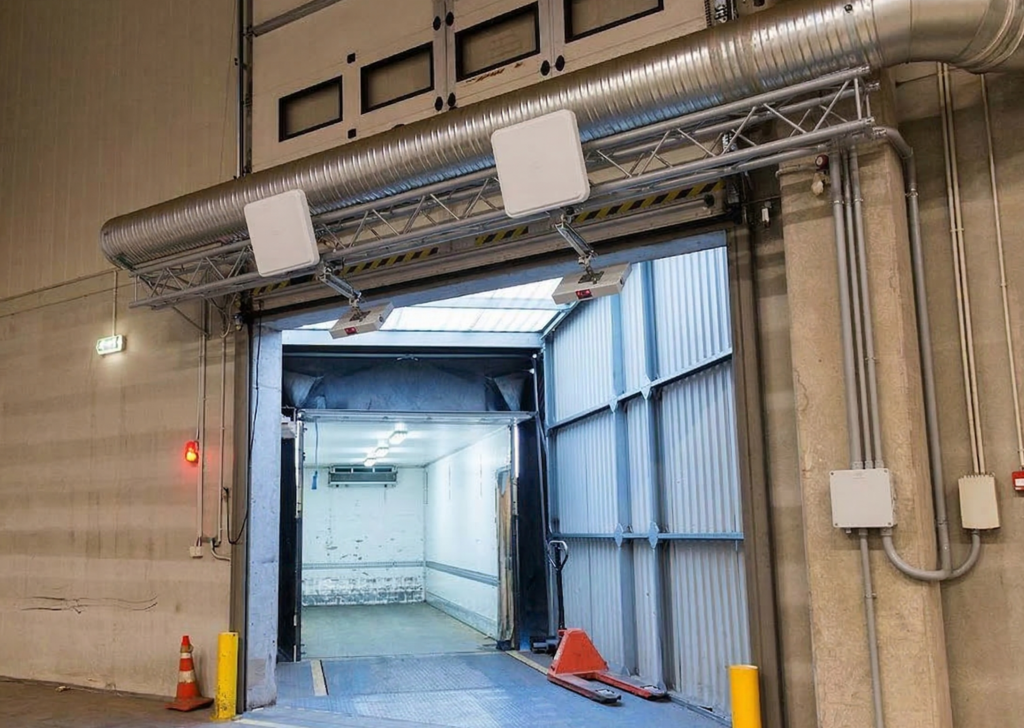
An RFID dock door portal places RFID readers and antennas around a dock door, doorway, or transfer point. Tagged assets pass through the read zone, and the system captures tag data as those assets enter or leave.
In a receiving workflow, a tagged pallet or case arrives at the dock. The RFID dock door portal detects the tag, and edge software checks whether that read belongs to the movement happening at that door. The system can compare the result to an advance ship notice, purchase order, or receiving record. When the event is validated, it can update the WMS, ERP, visibility platform, or dashboard.
In a shipping workflow, the same concept works in reverse. Tagged pallets, cases, returnable transport items, or containers move through an outbound door. The system verifies that the right assets leave through the right lane and can flag a mismatch before the shipment departs.
| Component | Role in dock door automation |
|---|---|
| RFID tag | Gives each pallet, case, tote, rack, or RTI a digital ID |
| Antenna | Shapes the read zone at the dock door |
| RFID reader | Detects tag signals as assets move |
| Edge software | Filters duplicate, stray, and irrelevant reads |
| AI model | Classifies true crossing events from background noise |
| Visibility software | Creates dashboards, reports, alerts, and integration events |
| WMS or ERP | Uses the validated event for receiving, shipping, and inventory records |
The RFID portal system does not need to be limited to pallets. It can be used for cases, totes, racks, carts, tools, reusable containers, and other tagged assets that move through dock or transfer points.
The stronger the software layer, the more useful the portal becomes. A basic RFID dock door can collect tag reads. A smarter system can determine whether a tagged asset truly crossed the threshold, whether the asset was expected, whether it belongs to the shipment, and whether someone needs an alert.
This is where Acceliot’s Smart Space Portal fits the dock automation problem. It is designed as a software-defined RFID platform that works with existing fixed RFID readers and antennas, including Acceliot STARflex and third-party reader systems. That matters for warehouses that already have RFID infrastructure but need better accuracy without tearing out installed hardware.
Why legacy RFID portal systems struggle at the dock
The dock door looks like a simple chokepoint, but RF behavior inside a warehouse is messy.
RF signals reflect. Tags can be detected from nearby staging areas. Read zones can overlap. Pallets may move close together. Forklifts, racks, metal, liquids, and packaging can all change how tags are seen by readers.
That creates a core problem for any RFID dock door portal: detection is not the same as discrimination.
Detection means the system saw a tag. Discrimination means the system knows whether that tag actually crossed the dock threshold. Receiving and shipping accuracy depend on discrimination.
Common dock door read problems include:
- Stray reads from tags near the door
- Cross reads from adjacent lanes
- Over reads from tags outside the intended movement
- Duplicate reads from the same asset
- False positives from assets that did not cross
- False negatives from assets that did cross but were missed
- Static tags that stay near the dock and keep appearing in the data
| Raw RFID issue | Business impact |
|---|---|
| False positive | WMS records an asset that was not actually shipped or received |
| False negative | An actual pallet or case is missed |
| Duplicate read | System creates noisy or confusing event data |
| Adjacent tag read | Inventory from a nearby lane may be tied to the wrong movement |
| Manual reconciliation | Workers must check manifests or physical inventory again |
Legacy RFID portal systems often rely on static hardware layouts and rules-based middleware. Those rules may work in controlled cases, but they struggle when the operation changes. Dock flow may vary by shift. Pallet density may rise. Forklift paths may change. A new product or packaging type may alter RF behavior. A nearby staging lane may start generating more unwanted reads.
The old answer was often physical complexity: tunnels, shielding, clearance zones, strict forklift paths, or extra manual checks. Those workarounds can help, but they also take space, slow workflows, and create new operating limits.
Modern warehouse dock automation needs a better answer. It needs contextual intelligence at the edge, close to the point where the movement happens.
The system should see the full flood of RFID reads but report only the events that matter.
How AI improves automated receiving and shipping
AI improves dock door automation by helping the system classify RFID reads.
In plain terms, the model learns the difference between a tag that truly crossed the door and a tag that was only detected nearby. That is the hard part. The reader may see both. The operation only cares about the one that moved through the threshold.
Acceliot’s Smart Space Portal uses supervised machine learning for this problem. RFID readers capture raw tag data. The system structures the data using RF physics, then an AI classifier evaluates patterns over time, signal behavior, antenna context, and movement signatures. The output is a cleaner stream of wanted tag data, while unwanted tag data is filtered out.
That creates a more trusted dock event.
For automated receiving, this can help teams identify incoming pallets, cases, or RTIs as they arrive. The system can compare those events to expected receipts, flag missing or unexpected assets, and support dock-to-stock updates with less manual checking.
For automated shipping, it can help verify outbound loads at the door. If the wrong pallet moves toward the wrong shipment, the system can flag the problem before the truck leaves. If the load matches the shipment record, the system can support faster confirmation and cleaner inventory updates.
| Workflow | Manual or legacy process | AI-powered dock door automation |
|---|---|---|
| Receiving | Operators scan and compare paperwork | Assets are detected, validated, and matched to expected receipts |
| Shipping | Workers rescan or reconcile before release | Door events verify that the right assets leave |
| Exceptions | Supervisors search after the error appears | Alerts flag mismatches at the dock |
| WMS updates | Data may arrive late or need correction | Validated events can feed enterprise systems faster |
| Automation | Bad data limits trust | Clean events support automated workflows |
This is also where the broader platform matters.
Smart Space Portal handles the dock decision point. Acceliot’s Edge Platform, or AEP, supports edge processing, reader orchestration, rules-at-the-edge, offline resiliency, and low-latency event handling. Acceliot’s Visibility Platform, or AVP, turns those events into dashboards, reports, alerts, sensor fusion, and enterprise integration.
That full stack is important because dock door automation is not just a door project. It affects receiving, shipping, inventory reconciliation, yard flow, transportation planning, billing, and analytics.
When dock events become trusted, the warehouse can use them as a reliable data anchor.
What to look for in warehouse dock automation technology
A strong dock door automation system should be judged by the quality of the events it creates, not by the number of raw reads it captures.
More reads can be useful, but only when the system can filter them. In a busy warehouse, a reader that sees everything but understands nothing may create more work for operators and IT teams.
Before choosing an RFID portal system, teams should evaluate the full dock workflow.
Key requirements include:
- Support for fixed RFID readers and existing infrastructure
- Antenna design for open dock environments
- Filtering for stray, duplicate, and adjacent tag reads
- Edge processing for low-latency decisions at the dock
- Supervised model training or another strong read validation method
- Integration with WMS, ERP, MES, TMS, YMS, or analytics platforms
- Real-time dashboards and exception alerts
- Inbound and outbound workflow support
- Scalability across multiple dock doors and facilities
- Offline resiliency during network interruptions
- Site surveys, RF engineering, and deployment support
The buyer question should be direct: can this system produce a movement event the business can trust?
If the answer is yes, dock door automation can support faster receiving, cleaner shipping, fewer manual checks, and better inventory accuracy. If the answer is no, the operation may still depend on people to clean up the data after the system collects it.
Acceliot’s approach is built around the trusted-event model. The company combines RFID hardware, third-party reader support, Smart Space Portal, AEP, AVP, mobile workflows, dashboards, sensor fusion, and deployment services to help teams move from noisy dock reads to validated dock intelligence.
For one facility, the first step may be a pilot on one or two high-volume doors. For another, it may be a phased rollout across receiving, shipping, RTI tracking, and cross-dock workflows. The right path depends on the current infrastructure, read environment, WMS or ERP needs, and the operational pain points that matter most.
The dock door is not just a doorway. It is the control point where warehouse automation either gains trust or loses it.
FAQs about dock door automation
What is dock door automation?
Dock door automation uses RFID, sensors, edge software, and workflow rules to identify and validate assets as they enter or leave a warehouse, distribution center, manufacturing facility, or logistics hub. It can support automated receiving, automated shipping, inventory updates, and exception alerts.
How does an RFID dock door portal work?
An RFID dock door portal uses readers and antennas around a dock door or transfer point to detect tagged assets as they move through the read zone. Software then filters the tag data, validates the movement event, and can update systems such as a WMS, ERP, dashboard, or shipment record.
What is the difference between an RFID portal system and barcode scanning?
Barcode scanning usually requires a worker to scan each label by hand. An RFID portal system can detect tagged pallets, cases, totes, or containers as they move through a dock door. RFID dock door automation can reduce manual scans, but it still needs strong filtering to avoid stray or duplicate reads.
How does AI improve dock door automation?
AI helps classify whether an RFID read represents a true movement event or background noise. In dense dock environments, readers may detect tags that did not cross the door. AI-powered filtering can separate wanted tag data from unwanted reads, giving WMS and ERP systems cleaner receiving and shipping events.
How does dock door automation improve receiving accuracy?
Dock door automation can identify inbound assets as they arrive, compare them to expected receipts or advance ship notices, and flag missing or unexpected items earlier. This helps reduce manual reconciliation and gives warehouse teams a more accurate receiving record.
How does dock door automation improve shipping accuracy?
Dock door automation can verify that the right tagged assets leave through the right outbound door. If a pallet, case, tote, or RTI is missing or misrouted, the system can trigger an alert before the shipment departs.
What causes false reads at RFID dock doors?
False reads can come from stray tags, overlapping read zones, nearby staging lanes, duplicate reads, metal racks, liquids, forklifts, or RF reflections inside the warehouse. The issue is not only whether the reader detects a tag, but whether the system can tell if that tag truly crossed the threshold.
Does dock door automation require new RFID hardware?
Not always. Some modern dock door automation systems can work with existing fixed RFID readers and antennas. Acceliot’s Smart Space Portal is designed as a software-defined approach that can enhance existing RFID infrastructure by adding AI-powered read validation and edge intelligence.